Technical issue – [ProQuest Ebooks]

We are currently experiencing intermittent access issues with our ProQuest ebook platform. This is due to an error at the vendor’s end and we apologise for any inconvenience this may cause. The error means that some users may see the following error message:

Error message reading: Sorry your institution does not allow access to ProQuest Ebook Central from your current IP address. Please contact your librarian


The message states, “Sorry, your institution does not allow access to ProQuest Ebook Central from your current IP address. Please contact your librarian”.

If you see this message you can try the following workaround:

  • Click on the below link which will delete ProQuest Ebook Central Cookies on your internet browser:
    https://ebookcentral.proquest.com/clearcookie/clearcookie.html
  • Once the tool has deleted the cookies, it will re-direct to the ProQuest Ebook Central landing page
  • You can then search for the ebook you wish to read.

If you have tried this workaround but still cannot access the title you need, please contact the library’s Electronic Resources team at ertenq@gcu.ac.uk

New resource – Statista

The library is happy to announce access to a new online resource, Statista. 

Statista is one of the world’s largest statistics and market data platforms, enabling access to more than 1.5 million statistics, forecasts, dossiers, reports and infographics on 80,000 topics from more than 22,500 sources external sources and exclusive Statista survey data.

Users can find Statista directly on the Library’s Discover platform, by searching for Statista in the Database A-Z or by clicking here. 

If you have any issues accessing the database, please contact the Electronic Resource Team at ertenq@gcu.ac.uk  

New resource – Social Policy and Practice

The library is happy to announce access to a new online resource, Social Policy and Practice.  Social Policy and Practice is a comprehensive bibliographic database for those working or studying in the health and social care sectors – bringing together information from the UK’s five leading collections of health and social care resources.

Social Policy and Practice helps professionals, practitioners, researchers and students interested in health and social care to identify articles and publications of relevance to the UK context. It is widely used by universities and NHS Trusts, as well as by charities and specialist research institutes.

With a focus on evidence-based information, topics and subjects span children and young people as well as adults and older people. These include: health and wellbeing, play, social and family policy, social care, crime and youth justice, child protection and safeguarding, mental illness, climate change and policy, and more.

Users can find Social Policy and Practice directly on the Library’s Discover platform, by searching for Social Policy and Practice in the Database A-Z or by clicking here. 

If you have any issues accessing the database, please contact the Electronic Resource Team at ertenq@gcu.ac.uk  

New look for EBSCO databases

**This update has been postponed until Summer 2026, the new interface will be live from the start of Trimester A, September 2026.**

EBSCOhost databases have migrated to a new user interface (UI) and this change will take effect at GCU from Summer 2026. This means that popular EBSCO databases such as CINAHL, Medline, AMED, Health Source, SportDiscus, Business Source and many other databases will look different. The new user interface is designed to be more modern and user friendly, while also introducing new features.

The Library will aim to update our training and teaching materials to reflect the new UI but development is ongoing. The best way to get online support in the meantime will be via Ebsco’s own quick start guide including links to tutorials (some include videos) on searching and browsing the new interface. Ebsco also have a list of upcoming webinars.

If you have any trouble accessing online resources please contact us at ertenq@gcu.ac.uk

If you would like help using any of our online resources, please contact your Academic Librarian here.

New anatomy resource – BioDigital Human

The library is happy to announce access to a new online resource, BioDigital Human.  

screenshot showing the main search box on the BioDigital Human platform

The BioDigital Human platform is a medically accurate, virtual map of the human body—composed of over 8,000 individually selectable anatomical structures, 600 simulated health conditions, and a toolkit to map and visualize data.  

Users can find BioDigital Human directly on the Library’s Discover platform, by searching for BioDigital Human in the Database A-Z or by clicking here. 

You can find guidance on how to use BioDigital Human here. Initial training for staff in key departments will take place on June 7 with further online training courses starting in September 2024; more information will be distributed ahead of time. 

This new resource will be replacing the Anatomy.tv resource. Access to Anatomy.tv will cease on the 26 June 2024. Any academic staff currently linking to Anatomy.tv on their module resource lists will be contacted individually by the library team. 

If you have any issues accessing the database, please contact the Electronic Resource Team at ertenq@gcu.ac.uk  

Technical issue [RefWorks citation manager]

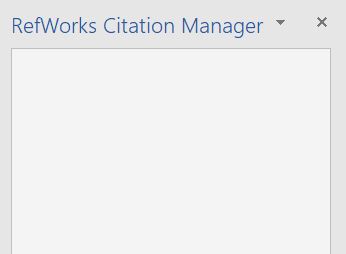
We are currently experiencing access issues with RefWorks Citation Manager. When users try to open the citation manager add-in in Word, they may see a blank screen, as displayed below:

a screenshot of a Word document. The RefWorks citation manager is open however the screen has not loaded and is blank.


IT services are aware of this issue and are currently working on a resolution. We apologise for any inconvenience this may cause.

If you are experiencing any other issues with online resources from the library, please contact the team via email at ertenq@gcu.ac.uk 


Technical Issue [Access to scans on Resource Lists] – issue resolved

We are currently experiencing access issues to Scanned material that loads using Kortext Reader on Resource Lists. This is due to unexpected downtime from the platform provider.

The provider is working to resolve this issue as soon as possible.

We will provide an update to this post with further information as we receive it.

We apologise for any inconvenience this may cause.

[UPDATE 29.02.24, 12.07]

This issue is resolved. Thank you for your patience, and our apologies once more for any inconvenience caused.

If you are experiencing any other issues with online resources from the library, please contact the team via email at ertenq@gcu.ac.uk 

New Resource List User Interface – FAQs

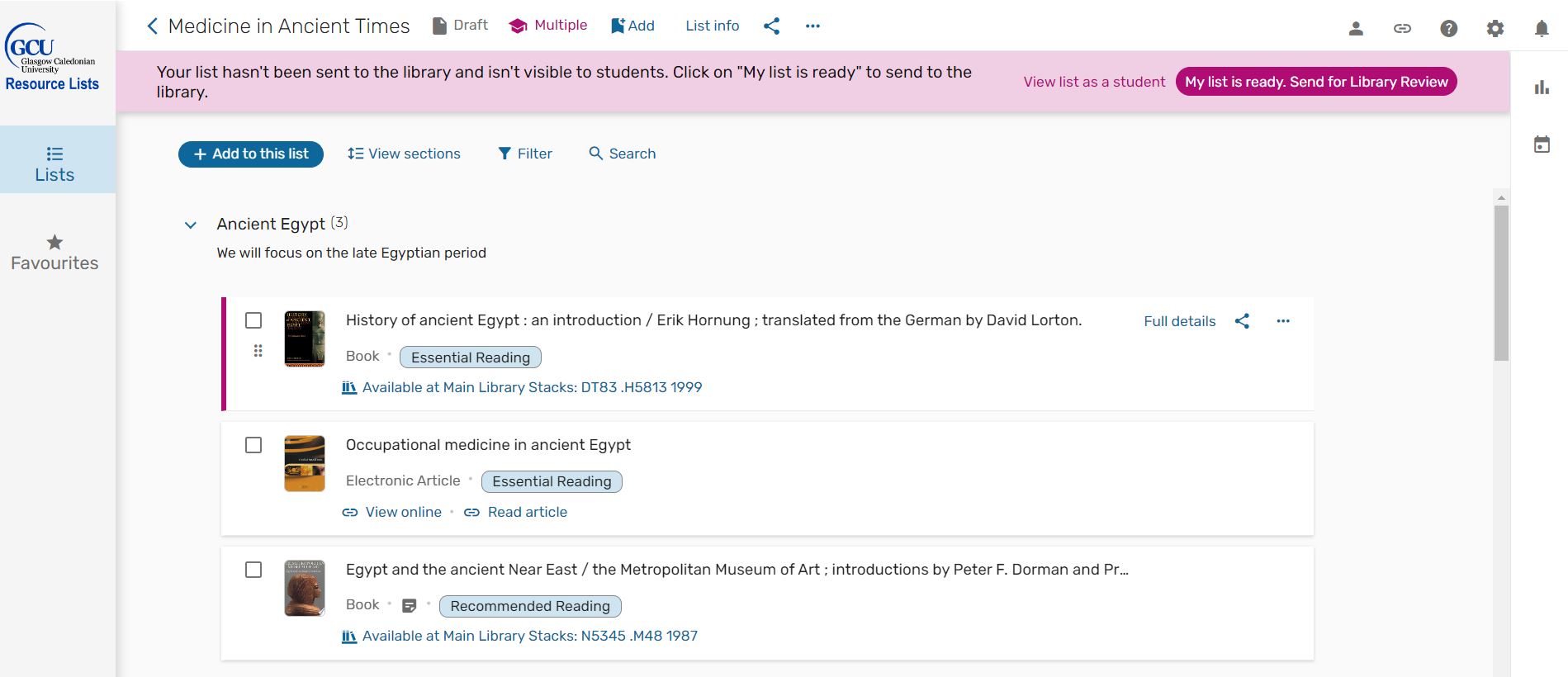
Screenshot taken from the new resource list user interface.

A screenshot of the new user interface

What’s happening?

The Resource List vendor is rolling out a new User Interface for Leganto (the Resource List system). The Library is currently reviewing the new interface in preparation for the switchover.

Why is this happening?

The Resource List vendor is introducing a new user interface to improve the user experience for students, academics, and librarians, aimed at enhancing the learning journey resulting in a cleaner and simplified interface. 

When will the new User Interface be implemented?

The new user interface will be available the week beginning Monday 24th June to coincide with the GCU Learn course rollover for the 2024-25 academic year.

How will these changes affect me?

You will notice a change to the look and feel of the Resource List system but most of the functionality will remain the same.  

Any lists that are already on the platform will still be available in the new user interface. In June, all existing resource lists will rollover to your new module codes as normal. Staff will not need to take any action unless they are creating a new list or updating their existing list.  

All links from GCU Learn will remain active. 

Staff will still be able to invite colleagues to collaborate on lists, add library content to their list, as well as freely available online content such as videos and podcasts.  

What has changed in the new User Interface? 

The new interface has been redesigned to have a simpler and cleaner look. For academic staff, there have been some developments to simplify user interactions with the platform, such as consolidating workflows and rebranding sections. 

Some changes you might notice are that the List Advisor is no longer available in the new interface, the way to view list analytics has changed, and that the ‘My Collection’ section has been renamed ‘Favourites’.  

Can I preview the new User Interface? 

Yes, you can see how your resource lists will look in the new interface by following the steps below: 

  1. Navigate to your current resource list on the platform 
  2. In the URL, update ‘readinglist’ to ‘nui’  
  3. You should now be able to view your list in the new user interface
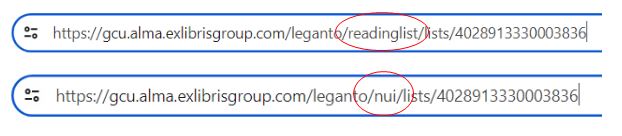
Image showing two urls in a browser window. One has the words readinglist circled in red and the other has nui circled in red.

Will training and guidance be available for staff? 

Yes, staff guidance and how-to videos are now available on the library website

We will be holding Resource List training sessions on various dates between July – October. To sign up for a training course, please look out for the Creating Module Resource Lists sessions on the Library Events Calendar. 

How can I find out more?  

We’ll continue to update this blog as we review the new interface but if you’d like more information or if you have any questions, please contact the Resource List team at resourcelists@gcu.ac.uk  

Scheduled Downtime [VLebooks platform]

Please be aware that there will be scheduled downtime on the VLebooks platform on Sunday 8th October between 4pm – 7pm in order for the vendor to perform essential maintenance. We have been advised that the platform will be VLebooks offline for approximately one hour during this period.

We apologise for any inconvenience this may cause.

If you are experiencing any other issues with online resources from the library, please contact the team via email at ertenq@gcu.ac.uk